Author: Kelli Matthews

  • New Year’s Resolution #5: Learn Something New

    New Year’s Resolution #5: Learn Something New

    This is the first in a countdown-style series of my professionally-oriented New Year’s resolutions.

    I love to learn. I am insatiably curious, even when I don’t want to be (or have time to be!). I have a mental list of things that I wish I knew how to do but don’t necessarily have to for my day-to-day work. So this year, I’m going to start checking some things off that list. I’ll start with these two.

    (more…)

  • Eat, Drink, Traffic: Food PR in Los Angeles

    Eat, Drink, Traffic: Food PR in Los Angeles

    Kelli’s note: This is a guest post from one of my faves. I’m so proud of Samantha, how hard she’s worked and all that she’s accomplished in her career so far. Samantha Luthra is a Senior Account Executive at Bread & Butter Public Relations in Los Angeles. You can find her on Twitter

    samanthaI work for Bread & Butter Public Relations, a boutique hospitality PR firm with offices in Austin, Dallas, San Antonio, San Francisco, and (my city!) Los Angeles.  Our tagline is “We Tweet. We Drink. We’re Merry.”, and I can confidently say that is the best company motto ever. My clients include Bravo’s Top Chef contestants, local restaurants, chain restaurant brands, and food product lines.

    Our office is located in Downtown Los Angeles, and we have eight employees. We do it all for our clients, and we thrive on getting results and having fun while we’re at it. 

    Bread & Butter PR LA is a girl’s club, and it’s not uncommon to hear us discuss a client’s event, The Real Housewives of Miami, and the latest Mashable article all within the same two minutes. I head up our social media division, Bread & Butter Bytes.

    When I’m not battling traffic, my day includes creating social media strategies for clients, managing my team to make sure all social media activities are carried out, keeping up on emerging social media trends, and meeting with clients to keep up with their ever-changing menus, events, and developments. It’s a lot, but it’s a good time!

    My entry into life in Los Angeles and a career in the LA food scene was a crash-course, but I’ve survived and have some takeaways:

    Read It & Eat It – The only way to keep up on the ever-changing dining scene is to read, and try not to get too hungry. To keep up on food news, I subscribe to Tasting Table, Thrillist, Eater LA, LA Weekly’s Squid Ink Blog, and LA Times Food to get the latest. Then, I follow up on my research by making it a point to try new restaurants and go after new, slightly scary dishes. Uni, anyone?

    Meeting Media – Sending an email pitch is fine, but having lunch with an editor is a much more fun and effective route to getting coverage for a client. Our PR account teams make a point to meet with media often, whether it’s for a lunch, drinks, or at events like Los Angeles Food & Wine. These meetings build relationships, and they always include tasty treats. Win!

    Social Social Media – To stay in the know on social media, I keep up on emerging digital trends, use social media both for clients and personally, and have made a ton of friends in the industry. I’ve learned that bouncing ideas off of a friend is often where the best strategies come from.  My favorite campaigns were created sitting at tables, sipping cocktails, and brainstorming/daydreaming. It’s important to keep the social in social. For the best social media brainstorms, I head to lovely restaurants like Gjelina in Venice or Little Dom’s in Los Feliz. All strategy is better with cocktails involved! I also Tweet about where I’m eating and tag the restaurants I like, which has helped me build relationships with chefs, restaurateurs, and food media.

    It’s PR, not the ER – There are days when I am stuck in traffic, my hair is flat, I’ve spilled my coffee and everything feels out of whack. The most important advice I’ve ever been given is to relax, breathe, and think. At the end of the day, this is PR, and not the ER. (Same goes for social media, too!)

  • Protected tweets? I won’t hire you.

    Protected tweets? I won’t hire you.

    I get it. I really do.

    There’s a desire to have conversations, interactions, silly back-and-forths with a specific and “controlled” community — your friends. It’s nice to feel some sense of control about who sees or does not see your content. You don’t have to filter or self-censor.

    In class last week, I made an off-handed remark that I wouldn’t hire someone who had a protected twitter account. When I said it, I heard an audible gasp in the room. What?! Why would she say that?

    So here’s why:

    When I hire, I need people who are smart and savvy about social media. For most entry-level professionals, the greatest indicator is how the individual uses their personal account. If your account is protected, I can’t see how you interact with people and what kinds of things you share (obviously). But what it also says is, “I don’t get how to use this tool as a professional. I’m just a student and the world revolves around me.” That’s fine. And your prerogative. But I won’t hire you. 

    I know not everyone wants to manage social media and spend their days on Twitter. The entry-level professionals I work with do, so that’s important to me and to my clients.

    However, there are plenty of other reasons you might want to reconsider protecting your tweets:

    • You’ll miss connections – plenty of people (including me) won’t follow people back with protected accounts. 
    • People won’t see things you might actually want them to see. Doesn’t do much good to share that portfolio piece or get job search advice if you’re not casting a wider net.
    • Your tweets aren’t searchable (and by the same measure, you can’t participate in tweet chats… just because you use the hashtag for a class, or a chat or a conference doesn’t mean everyone else can see your stuff. Only those people who are already following you can).
    • You can’t connect with new people and build your personal or professional network.
    • It’s not REALLY all that private – Screenshots, retweets and favorites make it really easy for others to share your stuff even if you don’t want them to.

    Don’t take my word for it:

    What do you think? Do you protect your tweets? If so, why? If not, why not?

  • Five Easy Ways to Create Reader-Friendly Documents

    Five Easy Ways to Create Reader-Friendly Documents

    I read a lot. Not much for pleasure, it seems, but between research articles, books for class, assignments and Web content, I read a lot. And I’m often frustrated with dense paragraphs, hard-to-decipher thesaurus-speak and unclear emphases.

    I have some instincts and some knowledge by osmosis of basic design principles that apply to making your copy reader friendly. You’ll find two parts to reader-friendliness: the first is the basic design and document formatting concepts that work. The other part is that your writing should be concise and meticulously on point. Every word, every sentence, every paragraph has purpose.

    I read assignments like I’m a member of the audience it’s intended for – the client, most often. Once you’ve edited and reedited, these tips can help your message get through, regardless of who you’re trying to reach.

    • Befriend white space – the space without words on the page gives the eye a place to rest. When powering through a 10 or 15 page PR plan, this can make the difference between an irritated reader who is just trying to find the point and one that follows your logic and keeps up with your best ideas.
    • Focus on short paragraphs – frequent paragraph breaks allow the eye to transition from point to point easily and soak up the main point. A good rule of thumb is to keep your paragraphs to three to five sentences (and sentences should be short – 15 – 20 words). Massive paragraphs that take up half the page are not reader friendly.Best case scenario, this makes me cranky. Worst case, I choose not to read it and you lose points (aka budget dollars, credibility, etc.). Of note: if you’re writing for the web, or in an email, consider even shorter paragraphs.
    • Slow the eye with bullet points – when your reader is scanning through your short paragraphs with ample white space, bullet points and numbered lists can slow your reader down and ensure that your key points stick. Of course, I’m assuming that you’re making good points to begin with. Bullet lists also help your reader understand steps in a process (awfully handy for, say, a plan).
    • Selectively use fancy formatting – ALL CAPS is difficult to read, as is underlining. Don’t highlight or use more than two fonts in any given document. For emphasis use bold and italics. For example, one might bold the key point of each item on a bullet list. ahem.
    • Think about margins – use left-aligned or ragged right margins, rather than justification for easier flow from line to line. I also prefer flush margins on the left with a hard return between each paragraphs (like the alignment in this blog post), rather than an indented paragraph with no space between. Using indented paragraphs is fussy and looks dated.

    What tips do you have for making your copy reader-friendly?

    Note: This is an updated & republished post from 2008. 
  • Internship Prepares This Duckling for a PR Career

    Internship Prepares This Duckling for a PR Career

    Kelli’s Note: This is a guest post from SOJC alumna, Kelly Brokaw.  

    What a crazy summer it has been! Since July 8th I have been an intern on the consumer tech team at the award-winning firm, SHIFT Communications!

    When I was an undergrad at UO, I never thought I would start my professional career as an intern. I had always hoped to skip that step and go straight into an account coordinator position. Thank goodness I did not choose that path!

    The knowledge and experience I have gained through  such a short period of time has been overwhelming, but so exciting. Here are a few tips I’ve learned that can help you with your current/future internship:

    Be proactive – when you’re not building media lists or performing other timely projects, make sure to do reactive research that can potentially help your clients. You can look at their competitors, search for relevant articles, get updated on the news related to their fields, and so many more tasks that can help your team out.

    Communication is key – no matter if your team has 2 or 10 members, make sure to always have instant communication with them. When a team member gives you a project, let him/her know your progress throughout the day. This not only will help eliminate distractions, but it also reassures your teammate that you haven’t forgotten about the project that was assigned to you.

    Don’t be afraid to ask questions – you’re an intern, therefore people are not expecting you to be perfect. If you are unsure about a project or have general questions, speak up! Your team would rather have you ask a million questions rather than you complete a project incorrectly or inefficiently. Plus, it also shows them you want to do great work.

    These are my three biggest tips! If you are a little nervous about jumping straight into an account coordinator position or can’t find one, definitely consider doing an internship.

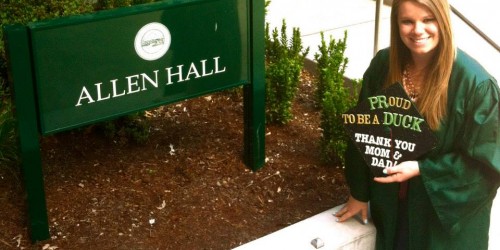
    About Kelly: I am a recent graduate of the University of Oregon. During my time at UO, I was a member of Kappa Delta Sorority, UORotaract and an account supervisor for Allen Hall Public Relations. Go Ducks!

  • Asking for a LinkedIn Introduction

    Asking for a LinkedIn Introduction


    LinkedIn is such a valuable tool for any job seeker, but for undergrads looking for informational interviews, networking connections or to research a potential company or interviewer, it really can’t be beat.

    But using it well (and not annoying your connections) takes a little know how and some LinkedIn etiquette. I think no where is this more true that in asking for introductions.

    LinkedIn allows you to reach out to people directly to make a connection (I always recommend adding a personal message about why you want to connect). However, using the “Get Introduced” feature, can help facilitate a connection and give you an edge.

    So how does it work?

    Start by finding someone you want to make a connection with. You can do this is many ways, but my two favorite (and most basic) are to a) search the connections of one of your contacts. If you’re connected to me, you have access to my 1500+ connections. You can sort by city (say you want to move to Los Angeles) or by company or a few other filters or b) search LinkedIn directly by name or company.

    Look for second degree connections. That means just one person exists between you and them.

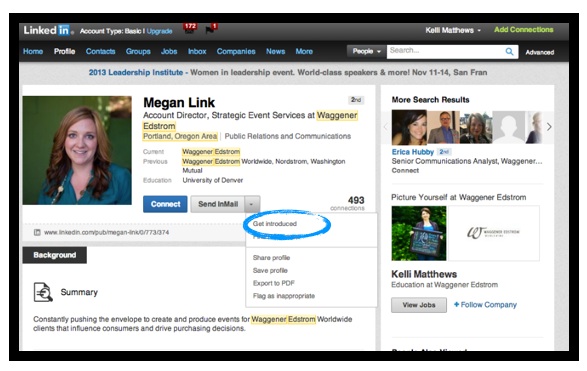
    Recently, I did a company search for Waggener Edstrom Worldwide. A lot of our grads work at WaggEd and it’s the largest PR firm in the northwest. In doing that search, I found an account director to whom I had a second degree connection. I found her profile interesting because we have so many students with an interest in event planning — and that’s what she does for WaggEd clients. Neat.

    So say I want to get connected to Megan. Here are the steps to follow:

    1. Click on the arrow next to “Send InMail” to get the drop down options. The first says “Get introduced.” Choose that option.

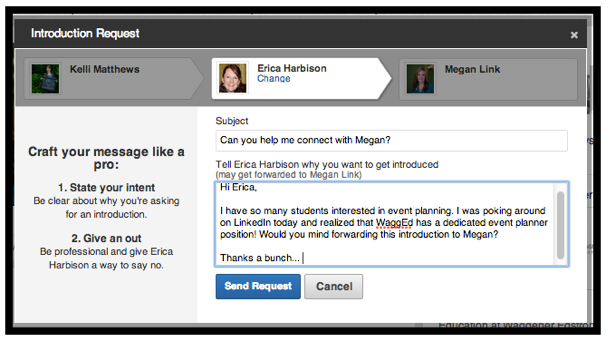
    linkedin-intro-screenshot 2. The next screen will show you all the people who you and the desired contact have in common. Turns out Megan and I have several mutual connections. Choose the one that you think would be most willing to “put in a good word” for you. I chose my friend, Erica, also an account director at WaggEd. She and I did our undergrad work together in the SOJC and I know she’d be willing to facilitate this connection for me.

    I started with a note to Erica about why I wanted to connect with Megan.

    Screen Shot 2013-05-17 at 9.09.44 AM


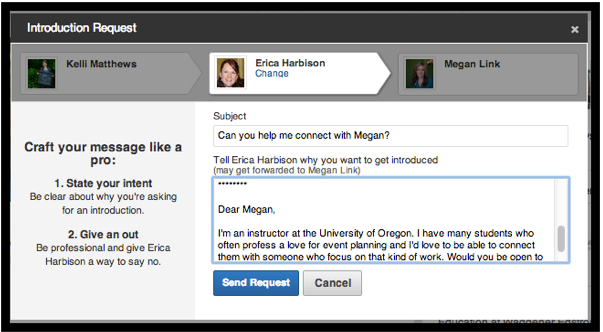
    3. The final part is the most important. To make it easy breezy for Erica to forward my connection request with her own note, I finish the request with a note directly to Megan. Consider a mini cover letter. Why do you want to be introduced?

    Screen Shot 2013-05-17 at 9.15.24 AM


    That’s it! Take a read through, do a final edit and hit “Send Request.”

    Erica will get a notice in her inbox that I’ve requested an introduction with the option to forward or decline.

    Have you used this feature of LinkedIn before? Any tips beyond what I’ve offered here?

  • PR in Practice: Disney Quietly Retracts Sexy Merida

    PR in Practice: Disney Quietly Retracts Sexy Merida

    [This is an example of an entry for J350: Principles of Public Relations final project. For more info on the project or to view student work, contact Kelli]

    In May of 2013, Disney announced that Merida from the movie Brave would become the 11th Disney Princess. As part of her coronation (an actual event at Disney World), Merida got a bit of a make-over. Apparently, she needed to match the other princesses in va-va-voomness.

    The backlash was fast and furious.

    One expert said,

    “This one character may not do any damage to a girl’s psychological development, per se,” said Dr. Robyn Silverman. “But Merida joins a barrage of thin, sultry characters for girls, making her yet another facet of our sexed-up, thinned down messaging.”

    Not even a week after she was introduced, the new Merida was quietly pulled from the Disney Princess website.

    Brave-merida-31837256-1600-1200As of May 15, 2013, Disney had yet to issue a statement. But the decision to pull the made-over Merida and replace her with the original Pixar image, is an example of situational theory.

    Situational theory acknowledges that not all stakeholders communicate equally with an organization. If an organization is communicating proactively, the idea is to identify publics (or specific subgroups of stakeholders) and whether they are active or passive. This way we know which groups need more attention and how to specifically target our messages.

    Three variables help us predict when publics will seek and process information about an issue:

    • problem recognition—must be aware there’s a problem;
    • constraint recognition—how publics perceive obstacles that impede a solution;
    • level of involvement—how much an individual or public cares about an issue. 

    In this example, I would argue Disney was not being proactive in its communication. It did not anticipate the high problem recognition of both fans of the original Merida and that of the public who is tired of over-sexualized cartoon characters.

    In addition, tools like Change.org, specifically, and social media, generally, lower the constraint recognition. There are few obstacles to voicing objections about … well, anything.

    The Change.org petition for keeping Merida brave has more than 200,000 signatures. 

    Public relations tactics don’t have to be blatant or visible. Disney pulling the “sexy” Merida sends a message loud and clear. Disney listened to its stakeholders and responded. Doing so quickly will help to rebuild relationships with parents and their daughters.

    Merida – I Am a Princess on Disney Video

  • New Awning, Same Hat(s)

    New Awning, Same Hat(s)

    Occasionally on this blog, I share updates about life & work. Some of these big milestones aren’t PR related, per se, but definitely part of life. And, in my book, it’s valuable for me to share this process as much as it is to share the ins and outs of PR work. I’m turning a pretty big page this week & onto a new-ish life chapter. I’m very excited & wanted to share here. 

    I am fortunate to have been able to grow my business in this community over the last 10 years. Through ebbs and flows, I’ve always been able to forge relationships with amazing organizations that have strong values and a solid commitment to our community. Together we’ve been able to do great work.

    I’m equally, if not more, fortunate to have the opportunity to extend my capacity by joining a team of outstanding communications professionals. Led by Dana Turell (previously with CAWOOD, a local marketing agency) we are forming the Turell Group, a marketing, public relations and digital strategy agency.

    Closing Verve Northwest Communications is a little bitter sweet. It’s been my “baby” for more than a decade… but I’m finding it more and more difficult to balance the business management side of the business with the ability to do what I love. I’ve known for some time that I need to make a change. I was waiting for the right change at the right time. This is it.

    Doing great work has to be my priority. Whether it’s in the classroom or in my professional work. I love what I do. And I’m exceedingly grateful to be able to do it. Now I can focus more on the “doing” and less on the administration.

    The Turell Group launches officially next week. We’re still working out the kinks of client agreements and office space and setting up new computers.

    For all intents-and-purposes, little will change quantitatively; I’ll continue to teach at the University of Oregon and also serve as a client counselor & strategist. I’ll just be working under a different awning & have a rock star team behind me. Look for more news soon!

    Plus, our offices have a killer view… (see photo above).

  • What Applebee’s Should’ve Done: Armchair Quarterbacking a Social Media Crisis

    What Applebee’s Should’ve Done: Armchair Quarterbacking a Social Media Crisis

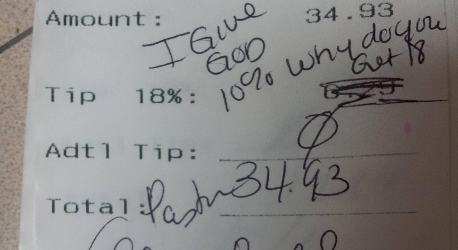
    The armchair quarterbacking as to how Applebee’s should’ve handled their total social media meltdown last week has begun. “They should’ve…”, “If they were smart, they’d…”, “Oh, you never do that!…”

    First of all, if you’re not up-to-speed on the disaster that Applebee’s created, this is an excellent recap. You should read it.

    As in most cases like this, the variables are hard to track and you’ll find speculation and rumors galore (not to mention rantings and rationalizations). So, for the sake of my argument, let’s start with a basic assumption: the server violated company policy by posting the image of the customer’s receipt.

    With that in mind, here’s what I see as the problems with Applebee’s responses:

    • Firing people has a greater chance of making you look like a big, stinky jerk than not firing someone. This is especially true when the “facts” are in question and the violation is something that a lot of us have done (or can certainly understand why one would do so).
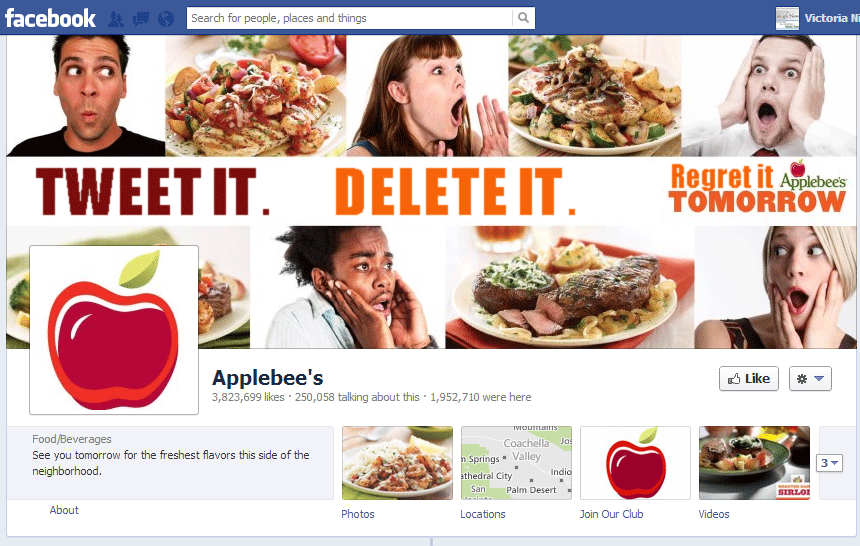
    • Not having a crisis plan with a social media component is stupid. Of course, not having either a crisis plan or a social media plan to start with is also stupid. Considering the shallow, promotional blather on the Applebee’s Facebook Page prior to this incident, I’m guessing it had neither.
    • The Applebee’s response on Facebook – from the contrite posts to the verbose comments to the time stamp of the responses (3 am? Drunk Facebooking anyone? This was an unfair comment based on time stamps reflecting time zone differences.) – violated social media management 101. But when you have no strategy and you don’t know how to talk to people, that’s what happens.

    Awesome photo by Decoded Science, which has a nice recap, too. 

    So, what should Applebee’s have done?

    • Not fired the server. I’m sure the company panicked, was trying to “set an example” and any number of knee jerk responses. Likely the action was taken by the franchisee and not the company (indicating the franchisee experience with social media and access to it is totally divorced from the corporate presence), adding a layer of complexity. But not firing the server would’ve saved a lot of headache. 
    • Issued an update early (as early as possible!) that said something like, “We value our relationships with our employees and our guests. We wouldn’t be here without them. We feel compelled to share our view on the photo shared by one of our servers. At Applebee’s, we’re committed to doing the right thing for everyone involved. We have apologized to the guest. In addition, we will immediately begin social media training with all our employees across every Applebee’s franchise, starting with the one in St. Louis where this occurred. We want our employees to be smart about risks not only to our business, but to their customers and to themselves. We also want employees who are empowered to share.”
    • Created a social media policy, which could be shared on social media channels.
    • Been transparent, authentic and, yes, human, in all its interactions.
    • Followed up with social  media training and demonstrated the company’s commitment in tangible, visible ways. Like maybe sharing photos featuring and taken by employees?

    By responding quickly and framing of the discussion, rather than letting it get completely out of control, Applebee’s gets to come out looking like the good guy instead of the big, stinky jerk. By treating everyone involved – the server, the guest, the Facebook fans – like people, the conversation would’ve stayed civil and “on topic.”

    Taking a longer-term view, Applebee’s clearly had no social media policy that was relevant to employees, had very little strategy in place (how many photos of food & promotional nonsense can you post?) and does not appear to have a crisis communications plan that included social media.

    As with most things like this, there were a lot of things Applebee’s should’ve been doing well in advance of any incident occurring to build goodwill and provide a culture in which something like this wouldn’t have happened (because employees understood their role) or if it did the company could’ve activated a plan to minimize damage and maintain relationships.

    Come sit in the armchair with me and do a little quarterbacking. What would your advice to Applebee’s be?

  • Being Professional: The “Hot Mic” Edition

    Being Professional: The “Hot Mic” Edition

    ESPN writes a check – a big one – for the right to broadcast the Rose Bowl.

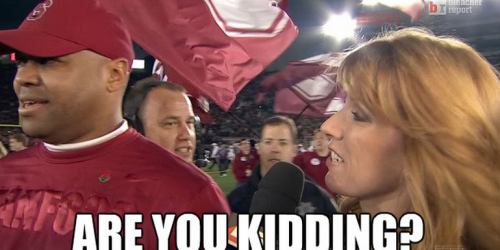
    Heather Cox was ESPN repoter the on-the-field reporter entitled to the (always riveting…insert eye roll…) post-game interview.

    Some dude with the Rose Bowl (possibly part of the Rose Bowl’s PR team) was attempting to usher Standford’s Coach Shaw to the trophy presentation and, apparently, wasn’t aware of the post-game interview expectation.

    The interview, part one, was a mess. Coach Shaw was being pulled in several directions. Cox looked like an amateur trying to control the situation and get her god d*mn interview (“Can we finish here…?”). Then as Shaw was pulled away, Cox’s mic was still on as she exclaimed, “Are you kidding me?!” It wasn’t clear who Cox was talking to – Coach Shaw? (rude) Herself? (understandable, I suppose) Her production team? The Rose Bowl dude? The American people?

    Brent Musberger was left trying to explain, and cover for, Cox’s actions and attitude.

    I appreciate that Cox was trying to do her job in a frustrating and chaotic situation. I appreciate that the Rose Bowl dude was not doing his job.

    However, people don’t like to watch sausage being made. The viewer doesn’t care if there was a miscommunication (and honestly, probably doesn’t care if there’s a postgame interview). And, while pretty amusing, Cox’s outburst turned her interview into the story. In PR and Journalism, we don’t want to BE the story.

    The interview, part two, reminded everyone of how boring post-game interviews are.

    See the video at Bleacher Report.

    What do you think?

    Related Posts with Thumbnails