
Category: Social Media

  • Finding Friends & Building Your Network on Twitter

    My social Network on Flickr, Facebook, Twitter...Image by luc legay via Flickr

    The question that I hear the most about Twitter is “How do I find people to follow?”

    Twitter often seems a bit overwhelming at first, but when you find the right people to follow (and follow you back) you can start to build really meaningful connections.

    To start, figure out who the thought leaders are. You can get a good sense of these by checking out lists of recommended people to follow.

    Three great lists:

    • Dave Fleet’s two lists of people to follow: one, two.
    • The Twitter Power 150 (the twitter IDs of the top 150 marketing, advertising and PR bloggers)

    But maybe you’re looking for people in a specific niche or outside the realm of marketing, PR and advertising? Some good applications to try.

    • TweepSearch: This site will let you enter keywords or locations and searches people bios.
    • WeFollow: Twitterers tag themselves with up to three categories. You can search by tag. This is a pretty new service, but seems to be very popular and populated with lots of people.
    • Nearby Tweets: Just enter a zip code, keyword and/or radius and find people in your community.
    • TwitterPacks. Find like minded people sorted by category and interest.

    Hopefully this list will give you some fuel for your twitter bus. You can also check out this great list of 100 twitter tools, designed for educators, but the tools can be used by anyone. And of course, lots of tips and resources via my Delicious bookmarks.

    Reblog this post [with Zemanta]
  • Are You Active? Including Social Media on Your Resume

    The first term my students blogged, I was thrilled if they completed the assignment and seemed to enjoy it. A few did (my favorite was Stu Holdren’s blog, Stu’s Clues), but almost no one kept the blog up longer than the end of the quarter. That’s been the case most terms since then.

    Of course there are a few (extremely notable) exceptions. Staci Stringer, Jessica Lomelin, Sarah Essary and Beth Evans all come to mind immediately.

    But for the most part, the blogs are abandoned after the 7 weeks assignment.

    Twitter seems to get a little bit more traction and become part of the students’ routines. But I would be lying if I said it was more than 25% of students that continue using twitter after it’s not required.

    There are lots of reasons for letting your blog and twitter profile to go seed. Students (and young professionals) are busy people. But recently a student came to me to help edit her resume for an internship. She listed “social media” in her skills. In her case, she seems like she’s in it for the long haul, but that’s neither here nor there. The point is, it got me thinking about when you should list “social media” on your resume as a skill – especially as a student.

    I asked my twitter friends and got a ton of response.


    My point wasn’t wording, specifically, but whether someone can claim social media as a skill if they aren’t actively participating (with the assumption the individual would not explicitly reveal that the blog was abandoned or the twitter stream had run dry). I’m going to share the replies here and then follow up with another post and my own thoughts on this subject later this week:


    Reblog this post [with Zemanta]
  • Blog Clearly & Purposefully: Transparency for Newbies

    Blog Clearly & Purposefully: Transparency for Newbies

    We talk about transparency a lot in social media (in public relations, too, for that matter). But what does that mean if you’re a blogger? And particulary, if you’re a new blogger.

    According to Paul Gillin‘s book The New Influencers, “transparency is about a lot more than just not lying. It’s about opening yourself up to inspection, analysis, judgement, praise and ridicule.”

    Gulp.

    That sounds a little frightening. But the blogging community has, over time, worked out some standards and guidelines that are not that difficult to follow and understand.

    When you get down to the nuts and bolts, transparency in the blogosphere means adhering to these community standards. Some basic rules:

    • Be familiar with the basics of copyright and fair use limitations. It’s important that you don’t plagiarize content (just link to the source!) or present others ideas as your own.
    • Your posts should be well researched and complete, try to avoid sweeping generalizations and jumping to hasty conclusions. Honestly, this is the biggest mistake I see new bloggers, and students in general, make in their writing. You can have opinions, even strong ones (please do!), but make sure your opinions are well-founded and you build a foundation on which to stake your claims.
    • Once you’ve pushed “publish,” don’t edit your post. If you need to make a change, do a strikethough the old information and insert the new. It is worth noting, however, that a strikethough doesn’t always mean that the author has made a change, sometimes it’s done humorously. (exception: you can correct typos if you need to, but don’t change anything that alters the post’s content)
    • If you need to make major revisions to your original, leave a comment on your post as a way of public correction.
    • Deleting a post is considered a major no-no. The only time this might be an option is if you think the post might result in harm to someone or could be seriously misleading.

    Consider adopting a codes of ethics for your blog (either formally included on your site, or informally for you to know and abide by – I recommend the former). This example from Charlene Li has laid the groundwork for many ethics policies including the GM Fastlane blog.

    • I will tell the truth.
    • I will write deliberately and with accuracy.
    • I will acknowledge and correct mistakes promptly.
    • I will preserve the original post, using notations to show where I have made changes so as to maintain the integrity of my publishing.
    • I will never delete a post.
    • I will not delete comments unless they are spam or off-topic.
    • I will reply to emails and comments when appropriate, and do so promptly.
    • I will strive for high quality with every post – including basic spellchecking.
    • I will stay on topic.
    • I will disagree with other opinions respectfully.
    • I will link to online references and original source materials directly.
    • I will disclose conflicts of interest.
    • I will keep private issues and topics private, since discussing private issues would jeopardize my personal and work relationships.

    What guidelines or standards have you seen, or do you recommend for bloggers? I know I’ve missed some of the deeper/more nuanced aspects of transparency and ethics, but anything I’ve missed here on the basics?

  • Life is a Mosaic. And Twitter is, Too.

    This makes me smile. Look at all these people! I *think* this roughly goes in order that you add people to your list. Those on the top row, I’ve known now for 2+ years (some pre-Twitter). What a fun tool.
    (Thanks Barbara Nixon for the link.)

    Get your twitter mosaic here.

  • Fun Tool: Twittersheep Herds Your Flock

    Twittersheep “herds your flock” and pulls the keywords from your twitter followers’ bios to come up with a cloud that looks a little something like this. I love that these terms are so varied! Everything from “PR” (duh) to “mom” and “guy” (regular folks) to “love” (passionate people in my herd, my friend) and “Oregon.” I’m not sure where “Junkie” comes from. I can’t take responsibility for that. See all my results here and try out your own!

  • Where Do You Find the Time? Social Media Time Management Tips

    I’ve always been a multi-tasker. Admitedly, I get a lot done in a day. I don’t know how, sometimes. I really don’t. But the answer I always give is “get enough sleep.” I am only half-joking. I don’t pull all-nighters. Ever.

    Now that I’m involved in social media, I get asked a lot how to manage it all. Over time, I’ve been able to integrate social media tools into my daily routine. In fact, social media tools have replaced other less productive forms of communication and networking for me.

    But I thought I’d share some tips about social media time management – especially for those just trying to figure it all out.

    • It takes time to create a new habit. Know that for a few weeks, you’ll have to work to make social media a habit. If you don’t check your feed reader every day, it won’t come naturally. If you don’t think about twittering, it’s not going to be top-of-mind.
    • Visual reminders help. Put the link or the page to your feed reader where you can see it. I put mine on my toolbar. This is a visual reminder that you should give it a quick look. You can also make your feed reader your home page. iGoogle or a browser like Flock gives you a home page with all your social web stuff in one place.

    • Participate! Don’t just be a looky-loo. My sister recently got the point of Twitter when she followed a well-known graphic designer, he followed her back and even commented on her work. “I’m hooked,” she told me. For Twitter in particular, you have to add friends and followers beyond your circle of friends or it’ll never be of value (not that your friends are valuable…). If you’re involved in conversations, it’s hard to not remember to go back and check in now and then.
    • Create a “social media to do” list. What tools do you want to try (or do you have to try because I said so)? Having a list to focus on will keep you from being drawn into the social media time suck.
    • Blog on Sundays. Or whatever day works for you. I do most of my blogging on a single day and schedule my posts out over the week. Sunday is my day. Basically, whatever the tools are that you use (or want to use), block out time to focus.
    • Be selective. You don’t have to participate in everything! Pick a few that you really want to spend time with, maybe one or two that are important, but take less administration and then leave the rest. For me personally, this blog and Twitter are the most important. PROpenMic and Facebook are second level priority. LinkedIn gets attention about once a month, just to keep it current. I also spend time when I can exploring other tools.
    • Think about rules for your social networks. I don’t follow someone back on Twitter unless I think that what they have to say will be interesting. Usually I’ll give people the benefit of the doubt but I’ll unfollow those who just aren’t a good fit for me. I don’t friend everyone on Facebook (which for me, is mostly personal and family-oriented).

    What tips would you add?

  • At the Starting Gate: Getting a Running Start on Your Blog

    Often the scariest thing about getting started with a brand new blog is the daunting task of coming up with new content on a regular basis. What on earth will you write about?

    My 16 Advanced PR Writing students are embarking on a blog-venture this week and I know this topic is top of mind.

    I’ve collected quite a few resources here that will give you plenty of ideas to get started (and honestly to keep you going for quite some time).

    OMG What Do I Blog About?: My list of 20+ ideas to get you started.

    20 Types of Blog Posts – Battling Bloggers Block: From ProBlogger, a terrific list of categories of posts, which might help you think about your own blog.

    Hey Blog Coach: My Blog Runs Dry, How Do I Get Started Again?
    : While clearly for a re-blogger, this list is also good for newbies.

    7 Types of Blog Posts Which Always Seem to Get Links and Traffic: A simple list, but good ideas to think about. You don’t want to be blogging into a vacuum, it’s great if people actually read your stuff.

    101 Great Posting Ideas That Will Make Your Blog Sizzle: Some common sense ideas, for the most part. But a good list to get you thinking.

    40 Ways to Deliver Killer Blog Content: From the master of content, Chris Brogan. Not a list of ideas, per se, but some great tips and ideas to make you think about your own blog. (P.S. Subscribe to Chris’ blog right now).

    50 Blog Topics Marketers Could Write for Their Companies: Think about this from a PR perspective, are there ways you could use these ideas and relate to your PR work in class or out.

    100 Blog Topics I Hope You Write
    : Rounding out the trifecta from Chris Brogan, this is a stellar list of great topics that I’m sure you can find some good ideas in.

    10 Steps to Writing a Successful Series: A series of posts on one topic is a great way to knock of several posts at once. This post will help you think about a series for your blog.

  • Your Favorite Social Media Resources, Please!

    I’m working with Michelle Honald at Ohio University in Athens, Ohio on a project and we need your help!

    Whether you’re a professor, a student, an enthusiast or just a reader – we’d love to hear about your favorite resources for teaching or learning about social media. We are particularly interested in books, but any resources are welcome!

    Professors: what are your favorite books? if you teach social media, what books do you assign?

    Students: what resources have you found most helpful in learning social media (books, in particular, would be great to hear about)?

    Enthusiasts: What’s on your bedside table? any favorite reads that have been particularly helpful?

    Just leave your feedback in the comments. We’ll definitely share the results!

  • The Magic of RSS: Really Simple Syndication for Really Smart Students

    Really Simple Syndication (RSS) has fundamentally rocked the way that, as consumers, we get information. You may not know the acronym, or know the technology behind it. But, trust me, it has affected your daily consumption of information.

    This is not just “online” vs. “offline” – it’s “push” vs. “pull.”

    Let me explain.

    Since the dawn of information, we’ve been beholden to the all-wise, all-knowing gate keepers to tell us what we need to know; whether it’s editors, PR people, educators and so on.

    This is “push.” Read this, listen to that.

    With RSS, we now have control over information. We “pull” what we want, when we want and how we want. This has rocked the traditional information providers and opened up a whole new world.

    Here, let Common Craft explain it.

    To maximize your use of RSS, you need a feed reader. And honestly, finding a good way to keep up on feeds is the best way to keep this social media stuff manageable.

    Here are the most popular:

    Google Reader: I’ve never loved Google Reader, but it’s often the one I recommend for students who are comfortable with the Google interface. I think there’s too much extra stuff going on with the page outside of my feeds.


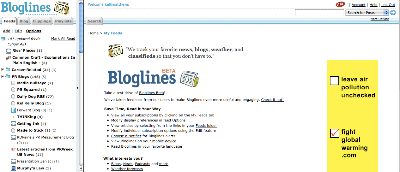
    Bloglines: For its ups and downs, I seem to keep coming back to Bloglines. Likely, that’s partially because that’s what I cut my RSS teeth on and what I’m used to. But when I compare it to some of the others on this list, it feels cleaner. What I don’t like – if you jump out of the feed you’re reading for some reason, that clears the unread posts out.
    Flock: Flock is beyond a feedreader, it’s a “social browser.” You can connect to your blog(s), Twitter, Flickr, video and get your feeds all in one place. I do like the interface and its a Mozilla thing, so it works a lot like Firefox. I just can’t quite commit to go all the way with a new browser, so I keep coming back to Bloglines. But this is definitely my second choice.

    Netvibes & Pageflakes: Netvibes and Pageflakes are pretty similar. Both are designed to be an “all in one” feedreader and iGoogle-esque home page. I like both. Netvibes imported my feed folders as individual tabs, which is a nice for organizing. The layout of both works nicely. I like the feedreader part better than Google Reader, so these are a nice alternate to iGoogle.

    Tips for making feed reading a habit you can manage.

    • Make your feed reader your home page – open a browser, greet your feeds. That seems easy enough.
    • Add browser button as a visual reminder – I have my bloglines button at the top of my Firefox browser, so it’s just within my vision to remind me that I need to see what’s up. I have to admit that creating the habit didn’t take long and now I’m as dependent on Twitter as I am the feed reader.
    • Set an outlook or other email reminder service to jog your memory once a day – if you’re reading any more than a couple of dozen blogs, you need to stay on top of it and check daily. Especially when you’re starting out. As you get in the groove, you can find your own rhythm. If I wait more than a couple of days, I have hundreds of posts to catch up on.
    • Use your reader + a social bookmarking application – if I only have time to scan, I’ll scan headlines, open posts that look interesting and tag them in Delicious. Then later, I can hit the highpoints and read the things that really caught my eye.

    For those veterans of RSS feed readers… any tips for the newbies?

  • New Voices for a New Year: Blogs to Read

    Happy new year! As part of my “social” resolutions, I am finding new voices to read, listen to and build relationships with in 2009. I thought I’d share a handful of new subscriptions I’ve added recently to my reader. I hope you’ll check out their blogs and find them on Twitter.

    • Dave Fleet’s davefleet.com
      Dave writes a lot of great stuff about PR. He had a communication planning series last year that was terrific and resulted in a free e-book that you can download. It was a tad different than the way we teach planning at the UofO, but styles vary from organization to organization and even client to client and it’s good to see and know lots of different formats. If you want a snapshot of what he has to say, you can check out his top posts of 2008 post. (@davefleet)
    • Scott Hepburn’s Media Emerging
      Honestly, Scott had me at this post, which I’ve bookmarked and forwarded to a handful of folks who I know will appreciate it. But look around, there’s a lot of great stuff here. He’s a talented copywriter and brings a great perspective to this new media stuff.(@scotthepburn)
    • Amber Naslund’s The BrandBox
      This Amber is one well-connected lady. I’ve enjoyed following her on twitter (@AmberCadabra) and really appreciate her blog. Her post on building on what you already have to participate in social media is a great one for anyone new to this stuff (including students!). Social media can feel overwhelming, but thinking about it piece by piece is an easier way to get your mind around what your organization (or your client) can do).

    I’ve added a few others in the last couple of months worth checking out, too: Danny Brown at PressReleasePR (@pressreleasepr), Beth Harte at The Harte of Marketing (@bethharte) and (not new, but I finally subscribed) David Meerman Scott’s Web Ink Now. (@dmscott) (I’ve also updated my blogroll recently, so you can check out my long time faves there).

    Do you have any new favorites?

    photo via flickr by Steve Kay

    Related Posts with Thumbnails