Blog

  • Finding Our Strengths

    Finding Our Strengths

    As the adviser for Allen Hall Public Relations, I spend a minority of my time teaching specific public relations skills. A minority would be an overstatement. It’s a sliver, a fraction… not much at all. So what do I spend most of my time doing? Mentoring and coaching students on how to be effective leaders, counselors and teammates.

    Every year we tweak and morph, change and adapt, looking for the key to creating strong foundations, building communications skills and prepping these young professionals to be strong leaders. Every year it seems we don’t quite make it… AHPR members are always awesome. ALWAYS. But I usually feel like there was more I could do.

    This year, I invited Corinne McElroy from Edge of Change to facilitate a workshop focused on the StrengthsFinder 2.0 book and assessment. I had the pleasure of being part of a workshop Corinne led earlier this year as part of my role on the Board of Directors of Committed Partners for Youth/Big Brothers Big Sisters of Lane County and knew immediately that it would be invaluable for AHPR.

    The premise of StrengthsFinder 2.0 book/assessment is that if we focus on what we’re good at, we can be more effective and efficient. Spending time getting better at what we’re “bad” at is not terribly productive. Yes, that’s an oversimplification, but I think it works.

    Let me give you a personal example. My top five strengths are: strategic, input, ideation, activator and positivity. What I learned through the workshop I did this summer and reading the material was that this means I’m a thinker. Most of what’s going on with me is in my noodle.

    That was a big “a ha!” for me. It’s helped me understand that I need to do a better job of articulating what I’m thinking – otherwise I can seem a little pushy with my ideas and maybe even (gasp!) aloof.

    The reality? I’ve been thinking about everything you’ve said, everything I’ve read and muddled it around until I feel like I can make the right recommendation. I’m not very good coming up with recommendations on my feet (unless it’s a situation I’ve encountered before) – and now I know why! I would often feel like I was lacking some skill or talent when I couldn’t speak extemporaneously like I saw colleagues do brilliantly. But all of those skills often mean I’m very deliberate and intentional and when I make a recommendation and I do so with conviction. It’s also helped me to embrace those things I’m good at naturally and focus my efforts more productively.

    So, all that to say that I saw the SAME “a ha!” moments with my students as they discovered how their strengths manifest themselves in their daily life. The beauty of everyone going through this together is that we now all have a shared vocabulary. “You’re an achiever, so you need to be careful about taking on too much!” or “Because you’re a maximizer, it’s important to know when good enough is good enough.”

    The workshop allowed students to do that individually, but also as an agency and in their client teams. So we have a profile of the agency (we are achievers, futuristic and maximizers!) and then each client team also has their profile. This is powerful stuff for student leaders to know and to be able to use.

    Because one of my strengths is “positivity” (it means exactly what you think it means), I also love that the StrengthsFinder is such a positive affirmation that students are awesome! And that they come to the table with so much to offer. I heard some students beforehand talk about what an “ego boost” just taking the assessment was and how this can help boost their confidence in client situations.

    None of this was technical or tactical. We barely even said the phrase “public relations.” It was all about connecting to each other and helping members step into their strengths as individuals, in teams and with the agency.

    Even if you’re not in an organization that can participate in a workshop, get the book! Get it for yourselves and your teammates and dig in on your own. Or call Corinne. 🙂

    But don’t take it from me! Here are some things that the members of AHPR had to say about the process:

    Karly Bolton, AHPR Firm Director (Twitter)

    I love StrengthsFinder! Corinne’s workshop came at the perfect time–it was only our third meeting, so Sam and I were thrilled to see new and returning members chatting and bonding over their shared and different strengths. The best thing about this exercise is that now we not only know our own strengths, but the strengths of our teammates, which will come in handy when it’s time to divide client tasks and projects. The only problem at the end of the night–I NEED to know the StrengthsFinder results of everyone I know!

    Shawna Haynes (blog, twitter)

    The workshop taught me that it is ok to have things we are not the best at. I am a maximizer too and I learned a lot about how to capitalize on it instead of letting it get the best of me. I also learned how to focus on what I do good instead of what I cannot do all that well. It was great to get to talk with others and find out how we can all work as a group to unitize each others strengths too. I think we have a great group and that it will be an excellent year!

    Jenna Cerruti (twitter)

    The workshop taught me to capitalize on my strengths instead of correct my weaknesses. I realized that I do focus on my weaknesses a lot more, and by trying to improve things about myself that I’m just not naturally good at, I am diminishing efficiency and confidence in my work. It would be much more beneficial (to me and my prospective employers) if I applied my strengths, which I learned are maintaining relationships and executing projects through strategic thinking.

  • Guest Post: Bright Lights, Big City – UO Duckling Heads to Chicago

    Guest Post: Bright Lights, Big City – UO Duckling Heads to Chicago

    Kelli’s Note: I am thrilled to host this guest post from Saramaya Weissman. Chicago is that city that ‘in another life’ I would love to live in. So proud of her for taking this chance and making it work! Saramaya is a 2010 graduate from the University of Oregon School of Journalism and Communication. She currently lives in Chicago and interns at Edelman Public Relations. You can reach her via Twitter at @SaramayaFaye.

    Exactly three months after I graduated from the University of Oregon I started an amazing and ideal internship at Edelman Public Relations in their co-global headquarters of Chicago. I’m SO thrilled to be here, but the job hunting journey this summer and figuring out “what’s next?” was no easy path.

    From a small town in beautiful north Idaho to wonderfully hipster Eugene, I was dying for a big city and had my eyes set on Chicago. After months of applying online, networking events in Oregon, and only a few actual interviews, my resume was unnoticed and I graduated unemployed. But with seven internships and numerous awards, I had confidence I’d be hired soon…right?

    The summer flew by and I was still floating around in Eugene. Living off graduation gift money and honestly, feeling like a failure, I wondered when and if I’d ever get my foot in the door. I still had my eyes set on Chicago, but there was one minor issue: I’d never been there before and knew absolutely no one in the Midwest, let alone the Windy City. So, what did I do? Network baby, network.

    So, I decided to just do it and do it now. I booked a ticket to Chicago for 10 days and started intense trip prep. I contacted everyone I knew from peers and professors to coworkers and family. “I’m going to Chicago in three weeks, know anyone I can set up an informational interview?!” From there, my trip planned itself. I took advantage of my current network and created one in Chicago.

    My trip to Chicago included hours of exploration and meeting with amazing individuals (some fellow alum) in the communications world. After stopping by Google, Chicago Mercantile Exchange, Chicago Cubs, and multiple PR agencies – I kept thinking, “This is great! I’m actually establishing my network,” and hoping to come back soon for real interviews. Little did I know, I’d be moving in two short weeks for an internship at one of the largest independent public relations firms in the world and recently named Advertising Age’s Top-Ranked PR Firm of the Decade.

    Special shout out to Kelli Matthews who connected me with a fellow alum at Edelman in Chicago. I met with him, HR, and a junior employee (each individually) on a Tuesday, was asked to take the writing test on Wednesday, had a second interview with senior executives on Thursday, and offered a three-month paid internship on Friday! The day I flew out from Chicago was the day I started planning my move back (across eight states). I did it! I was aggressive with networking (both old and new contacts) and it was worth it! I felt (and still am) ecstatic!

    My words of advice if you’re still on the hunt (or feeling like you are in the back-up plan) – don’t settle for anything (in my case, I needed a city and one not in the Northwest). Go for what you want and you absolutely will find it. Just remember to remain confident and even when you might feel like a failure (and I definitely did), know that you simply haven’t found the right fit yet. Just keep looking and you will absolutely find it.

  • Brand-Tweeting-New: Tips for Twitter Newbies

    Brand-Tweeting-New: Tips for Twitter Newbies

    We’re kicking off another year at the University of Oregon. I’m not teaching social media-focused classes this term, but I always encourage my students to tweet and use a hashtag for the course. This term you’ll likely see #J350 and #J453 tags from students. Because the classes aren’t social media oriented (although certainly infused), I don’t take time to “teach” Twitter. But I’m not under the illusion that it’s intuitive and doesn’t need to be demonstrated. It’s been awhile since a did a post with resources and tips for those new to the microblogging platform, so here you go!

    Some of my favorite resources on Twitter basics

    • Twitter 101 for Business: Written by the folks at Twitter, this guide is a terrific how to on using Twitter professionally. For journalism students, you really do have to think about all social media in that way. You’re a professional communicator and all your communication should reflect that.
    • Twitter’s Twitter Basics: A helpful guide from Twitter that covers a wide variety of topics.
    • College Students Guide to Twitter: This has long been one of my favorite resources for Twitter. I’ve shared it many, many times.
    • 10 Ways Twitter is Use for PR Practitioners: An overview on the top 10 reasons PR pros can find Twitter useful.

    Who to Follow

    • Twitter Starter Pack for PR Students – a list created by another professor of her recommended people to follow. You can follow everyone at once.
    • 100 PR People to Follow – another list based on a blog post that identified the top 100 people in PR to follow. The two lists will have some overlap.
    • WeFollow.com – A handy directory of Twitter uses categorized by tag.

    More Tips

    • Give Twitter at least 30 days & aim to follow and be followed by at least 100 people. Thirty days because Twitter is not intuitive – it takes time to figure it out. And the 100 following/follower level forces you to think outside your physical/offline networks and connect with new people.
    • Participate in chats: There are a few Twitter chats either specifically geared toward students or are particularly useful. Top 10 chats for PR & Marketing professionals. That list doesn’t include two that are specifically targeted at student and young professionals, so check out #PRStudChat and more about #u30PR0.

    What are some of your favorite Twitter basics tips or resources?

  • Seven Ways Student Journalists Can Use Social Media

    Seven Ways Student Journalists Can Use Social Media

    I had the opportunity to chat with the staff of the Oregon Daily Emerald about how they can use social media for themselves and the publication.I borrowed liberally from a recent Mashable article, adjusted, modified and expanded it to provide a handful of tips for student journalists.

    I would preface all of these with the recommendation to sit down and spend a little time setting some personal and professional goals for yourself. Think about what you want to be known for and what you want people to remember about you. Knowing your goals will help you make intentional decisions about where to spend your time and energy when it comes to social media activities. Consider it a personal mission statement.

    1. Promote your content
      Use your social media network to promote your content. Post your articles/blogs on twitter, your links to YouTube videos on your Facebook page. As long as you’re using social media for more than just promoting your work, then sharing what you’re doing will be welcome by your network.
    2. Newsgathering and research
      This is probably the most obvious. Using  social media to learn more about the issue of the day, your sources, etc. can all be done with social media. I use social media for this purpose everyday and I even have a client who “facebook stalks” her clients to learn more about them (in a good way, I promise).
    3. Crowdsourcing and building source list
      You’ll meet lots of interesting people hanging out on social media, but even cooler? All those people know more people. Use your network to ask questions, find sources and generally do your job better.
    4. Publish more content
      If you’re a student journalist and you don’t have your own blog, your own YouTube channel and your own Flickr profile, you’re missing out on an opportunity to share more of your work than will ever fit in the print edition of your publication.
    5. Integrate blogs & other social content
      Look for ways to integrate your blogs and other social content on your organization’s home page. Different people connect in different ways, let them know where you hang out.
    6. Build a community & share rich content
      Join online groups and networks that make sense for your personal goals and while you’re there, ensure you’re providing rich content. For example, “I’m eating a sandwich” via Twitter is lame. But “Wow! This BLT from Marche Cafe has the most amazing locally-gown heirloom tomatoes” is interesting. This tweet shows you understand your local community and local business (which may be important for your network). But really, the specifics aren’t the point, the point is to think about providing content that says something, not total fluff. Although some fluff is ok sometimes, too.
    7. Personal branding
      Social media can really help you develop a personal brand. Find your niche and show what you know and who you are. Just remember your personal mission statement and goals. What do you want to be known for. And really a solid personal brand comes from having the work to back it up, not just a shiny image. There’s lots to say about this, and I won’t go into too much depth, but you can check out some posts I’ve tagged on the subject or just google it. It’s a hot topic these days.

    Some bonus tips:

    • Always be mindful that you represent more than yourself. As a journalist, the stakes are higher.
    • Always be aware of what you put online – it will go further than you think.
    • Experiment!! Try stuff out!

    image by the tartanpodcast

  • What a Dilemma! Ethics in the Modern Age

    What a Dilemma! Ethics in the Modern Age

    I’d argue that we all face ethical dilemmas every day, particularly in and with social media channels. They may be small (should I say this or that on Facebook) or they might be bigger (no, I can’t pepper the web with positive reviews of that client’s product or service).

    As you probably know, I’m working on a book with my friend and colleague, Michelle Honald. We’re focusing on the ethics of social media in one of the chapters. I’d love to hear your stories and examples of ethical dilemmas that you’ve faced working in public relations (or any type of communications).

    You can leave actual or hypothetical examples in the comments or email me.

    I’m not (necessarily) looking for case studies, I just want to make sure I cover the reality of ethical decision making for those of you working in social media.

    photo by yewenyi

  • My Top 5 Shortcuts: #5 Try Stuff!

    My Top 5 Shortcuts: #5 Try Stuff!

    Over the last month or so, I’ve been sharing some of my favorite short cuts for managing social media and online life in general. These are shortcuts that work for me.

    But know that you’ll likely create your own shortcuts that work for you and make no sense to anyone else. Don’t be afraid to try stuff out and seek out new tools. The more you explore and learn the ins and out, ups and downs of social media and web 2.0, the better you’ll be about deciding what makes sense for you.

    Trying stuff is the best part about social media. Sometimes I cringe when there’s a new tool on everyone’s lips, wondering how I’m going to find the time to manage one. more. thing.

    But that’s my job! To try it out and figure it out and decide if it’s worth integrating into my work (and my classes) or not. Ultimately, it’s not a chore, but a new challenge.

    For example, Foursquare might drive you  bonkers. Just writing it off as “stupid” or  a “waste of time” sounds an awful lot like laggard-speak. And you don’t want to be a laggard! More importantly, though, you’re not doing your job as a communications professional if you don’t check it out and make an informed decision. I happen to think Foursquare is pretty fun. And it turns out, it has been valuable for clients, too. But my initial reaction was, “ugh…”

    My favorite Web 2.0 exploring site is Go2Web20.net. It’s a directory of Web 2.0 applications that, I swear, I could spend hours perusing. Some apps are weird. Others are entertaining and some are downright useful.

    The bottom line, however, is to explore! Have fun! Now get out of here. I’d love to hear what you find.

    image by kevindooley

  • My Top 5 Shortcuts: #4 Use a Smartphone

    My Top 5 Shortcuts: #4 Use a Smartphone

    This is a quick tip, but an important one. See tip 1 on feedreaders, 2 on creating a process and 3 on using twitter, too!

    If you’re in communications – get a smart phone. For real. It doesn’t have to be an iPhone. Just get a smart phone.

    A quick scan of Twitter or Facebook, a timely update to your Tumblr or blog, even being able to handle an urgent situation are all possible from the palm of your hand. Knowing I can “hear” if someone is talking to me (or a client) saves me a ton of time.

    It’s also not all about social media specifically, but for generally being productive and saving myself time.

    Applications I use to help:

    • Twitter for iPhone
    • Tweetdeck for iPhone (yes, I use 2, I monitor a bunch of accounts)
    • Facebook with all the Pages for which I’m an admin bookmarked.
    • Tumblr for posting photos (this is a personal outlet for me)
    • WordPress (although I rarely use it, I have it set up if I need to)
    • LinkedIn (again, not often used, but you never know!)

    Other productivity apps I use:

    • Harvest (my time tracker. If it’s on my phone, I can track my time on the fly.)
    • TeuxDeux (my favorite list maker, to do list builder)
    • Huddle (my project management/coordination program)

    Do you have any apps you use to help manage social media (or your life)? I’d love to hear about them!

    photo by K!T

  • My Top 5 Shortcuts: #3 Use Twitter

    My Top 5 Shortcuts: #3 Use Twitter

    Bloglines, my first feedreader, announced this week that it would shut down October 1. If one can feel nostalgic about something like that, I certainly did.

    The spokesperson said that the “writing was on the wall,” that most people were getting their news from Twitter & Facebook. I’m not going to disagree that more people are indeed doing so, but I don’t think the feedreader is dead. At least not for people who work in communications. You can’t possibly get all your news from Twitter and Facebook.

    However, you also can’t subscribe to every blog on your topics of interest. Using the two tools in a complementary way will help you stay in the know and also save you time.

    Find the right people to follow

    It’s important to find the opinion leaders and influencers for you on Twitter. There’s a lot of noise, so be smart about who you pay attention to. That doesn’t mean to be a follow-back snob (you can see my follow back tips here).

    I wrote a post a while back on how to find people to follow, too.

    Build lists

    Before Twitter integrated its list function, folks (like me) were using Tweetdeck’s column feature to filter their Twitter stream. Lists can do that, but, because they are public, they can also help show your participation in a community and build connections across your network.

    However, as a time saver, lists can serve a couple of purposes. The first is to organized the updates of people who you follow by category, industry, name, whatever you choose. Most third party applications (see the next tip) will let you sync your lists, too. The second is you can see other people’s lists, which can follow. No need to build that CNN Reporters list if one already exists, right?

    Use a third party application like Tweetdeck

    Twitter can be a giant time suck, I’m fully aware. Time suck? Sort of the opposite of short cut. However, Twitter is a necessary tool. I use Tweetdeck for my personal Twitter use. I leave it running most of the day and have the notifications set to only alert me when I’ve been mentioned, I have a direct message or one of my search terms has a new result. The visual and audible notification means that I don’t pay attention to Twitter unless there is something going on. Well, that’s not entirely true, but it does help a lot.

    How about you? Any twitter-related shortcut tips to share?

  • My Top 5 Shortcuts: #2 Create a Process

    My Top 5 Shortcuts: #2 Create a Process

    The cost of social media isn’t in the hard costs, it’s in the time costs. Creating a process for yourself will help save time and also make social media activities a part of your routine. If you missed Tip #1, check out my advice on setting up an RSS Feedreader here.

    I find it challenging to share my personal process because I’ve developed it over more than four years. So take what you think will work and modify the rest to work for you. The point is to have a process, not replicate my process.

    My process basically breaks down into three categories – making time to track, time to write and time to play.

    Time to Track

    You’re doing all this great monitoring with your feedreader, but you  have to give yourself time to track – time to read and browse your feeds, your Twitter stream, your Facebook news feed. Input is crucial for good output (see the next section).

    Your process may mean scanning as you have time during the day or in the evenings or maybe between tasks. Or it may mean setting aside a specific block of time during the day. I do recommend finding time every day so you can create a habit of using social media to track news and trends. I tend to scan a little here and a little there, using Twitter as my most common “input.” Through Twitter lists and columns on Tweetdeck, I can filter out some of the noise.

    Time to Write

    Creating content means spending at least some time being thoughtful and some degree of focus. I find the best times to blog for me are either a) on Sundays or b) when the spirit moves me. Sundays have just turned into my “surf the Internet, mentally prepare for the week but don’t work too hard” days. Blog writing me fits into that bucket. I enjoy writing. I enjoy blogging.

    But your time to write may be different. Figure it out for yourself – and it may take some stops and starts. You may have to try a few different things. That’s ok!

    Even if you’re not blogging, you’re still updating, tweeting (or whatever) and that means you’re creating content. Give yourself time to do it well.

    Time to Play

    If you’re not doing some fun stuff with social media, it’ll quickly become a chore. Fashion, gossip, design, sports… whatever you enjoy for fun, find a way to incorporate that into your social media “process.”

    What’s worked for you? Do you have a process? Share it with us here.

    mindmap photo by sirwiseowl

  • My Top 5 Shortcuts: #1 Use a Feedreader

    My Top 5 Shortcuts: #1 Use a Feedreader

    I’m often asked about how to best handle social media maintenance and management tasks. Over four years or so I’ve developed a few shortcuts that work well for me. I’ll explain each in a separate post, but we’ll start with feedreaders!

    Yay feedreaders!

    Using a feedreader to track blogs I’m interested in along with keyword searches is my number one shortcut. It was thanks to Bloglines, my first feedreader that I really started to understand social media. I subscribed to PR, social media, marketing and advertising blogs left and right. By doing so, I learned best practices and social media etiquette through observation.

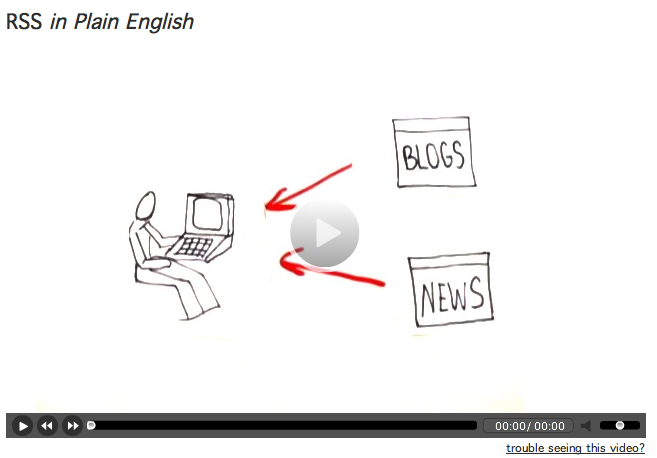
    My use has changed a little bit, which I’ll explain. First, though, take a peek at this video from Common Craft, it’ll give you the basics (click on the image).

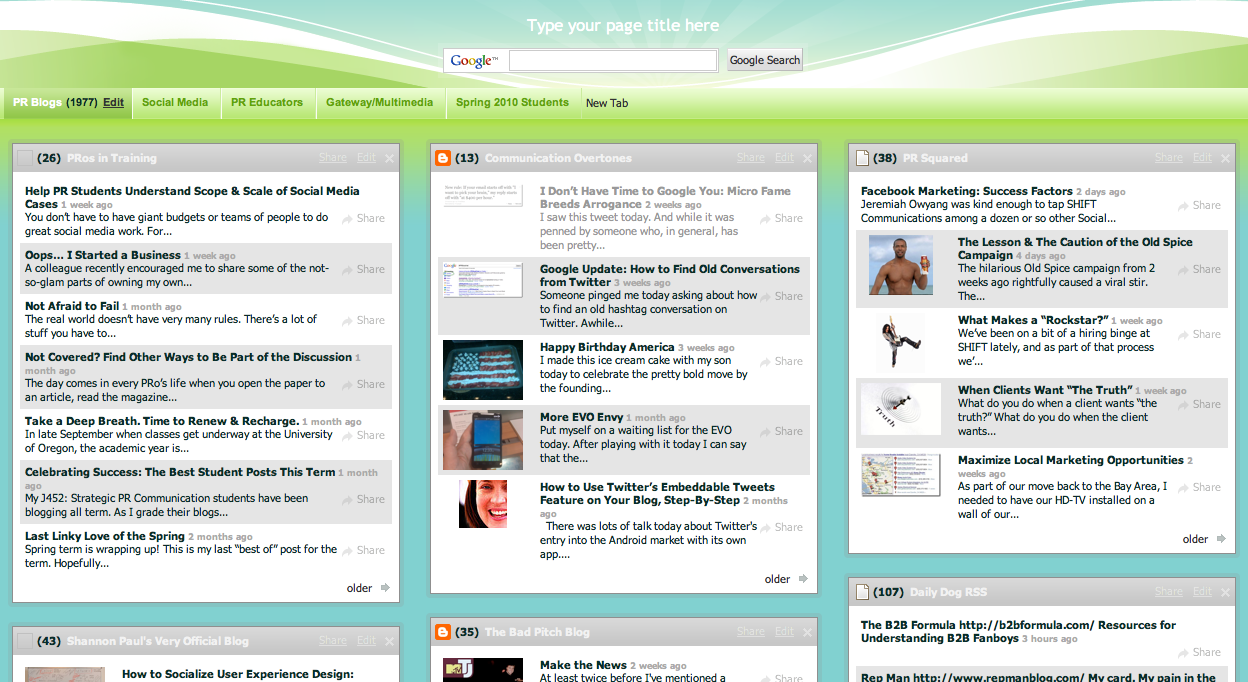
    Common Craft recommends Google Reader, which is very popular. The aesthetics of Google Reader just don’t work for me – nothing personal, Google. I use Netvibes. I like the “dashboard” feel to it and I can separate different clients, interests, projects into their own tab.

    You can see how this looks at the public Netvibes dashboard I set up. Feel free to use this as a start for your own. Once you create an account with Netvibes, any changes you make will be saved.

    What’s in my feedreader:

    • Six or so tabs related to PR, social media, marketing, nonprofit work, advertising, etc. Each has its own tab and each tab has 10 – 20 different blog feeds. I’ve found the best blogs (for me) that I want to subscribe to.
    • A tab for each client for which I do listening and monitoring activities. For clients I subscribe to interesting blogs and also subscribe to search results. This is really how my use has changed. I use my feedreader more for managing and maintaining client social media than for my own purposes. (I’d say it’s a 60-40 split in terms of how much time I spend… 60% on client stuff and 40% on my own).

    Subscribe to search results? Why yes! I do keyword searches with (at minimum): Google, SocialMention, IceRocket, Twitter, Flickr and YouTube. When you do the search on any of those sites, you can subscribe to the results. Look for the RSS icon on the page or in your address bar on your browser.

    It takes some time up front to set up a useful dashboard. Once it’s set up, not only do you know if you or your client is mentioned on a blog or a tweet, but you also have all kinds of “input” at your fingertips for creating great content. I rely on my feedreader for inspiration for tweets and for blog posts. By spending the time upfront to make a useful dashboard, the day-to-day or week-to-week maintenance is lessened.

    You can do some pretty cool things with RSS (as a subscriber). Some tips:

    • You can subscribe to specific categories on most blogs. Maybe you’re not interested in everything everyone says on a frequently-updated site, but are interested in a specific topic or category. You can pull just those posts.
    • A site called PostRank will let you subscribe to just the most popular posts. I’ve done this with sites like Jezebel or Perez Hilton because there are just too many posts to keep up with everyday. Yes… I have subscribed to Perez Hilton. Don’t judge.
    • Tools like Yahoo! Pipes let you dump a bunch of sites in one end, along with some keywords and out the other end? A custom RSS feed. I think this could be a sweet tool for media monitoring (put in New York Times, USA Today, etc. etc…. filter for your company name and voila!), but I haven’t tried it out yet. Yahoo! Pipes is a bit “techy,” so beware.
    • Create an RSS feed where none exists. This is a little more complicated, but it’s possible! This post overviews a few of the tools that can help. The post is a tad dated, so I’m not sure all the tools listed still exist, but I’ve tried a few with varying degrees of success. This is also on the techy side.

    Final tip: Making checking your feedreader part of your daily routine. Set the feedreader as your homepage, add it as a shortcut on your browser, or leave yourself a reminder (physical or electronic) to take a peek.

    Any other tips? I’d love to hear how you’re using feedreaders. Which reader are you using and why?

    [this post is cross-posted at Verve: In Bloom]

    Related Posts with Thumbnails